HOW TO
How to Chat
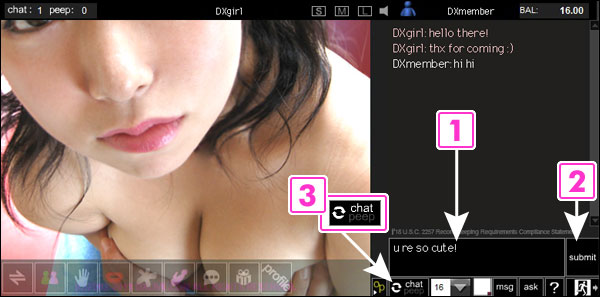
1. Type here
2. Press "submit" or Enter key
3. If you change the "chat" mode to "peep" mode, the girl would know that you prefer not to talk but to observe. You can click the button again to change back the mode.
2. Press "submit" or Enter key
3. If you change the "chat" mode to "peep" mode, the girl would know that you prefer not to talk but to observe. You can click the button again to change back the mode.
How to Chat with Your Mic and Camera on
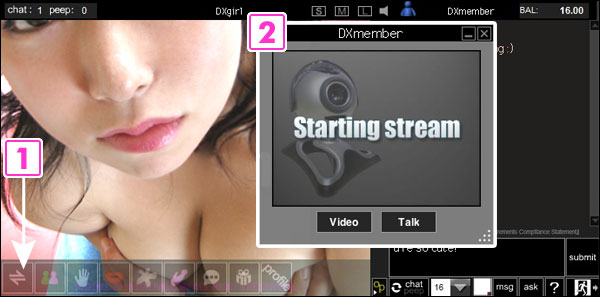
1. Click "2Way" button
2. A small window appears, and you can choose either "Video" or "Talk", or both at the same time for the same price
*You need to have your mic and camera connected to your computer to use this function.
2. A small window appears, and you can choose either "Video" or "Talk", or both at the same time for the same price
*You need to have your mic and camera connected to your computer to use this function.
How to Use Remote Controllable Sex Toy
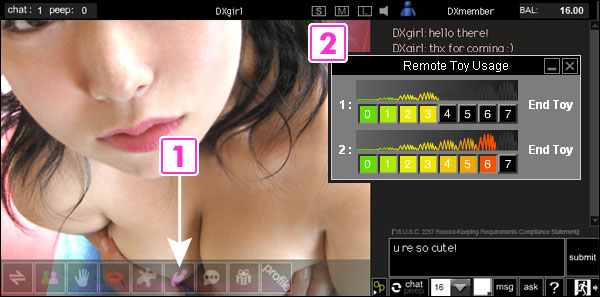
1. Click "Remote Toy" button
2. Control the level of vibration by clicking the numbers
*You will see the gauge bar while someone else is controlling the toy.
*Some girls do not have toys.
*When you use a remote toy, 1 point per minute will be charged in addition to the basic charge.
*When you use TWO remote toys at the same time, 2 points per minute will be charged in addition to the basic charge.
2. Control the level of vibration by clicking the numbers
*You will see the gauge bar while someone else is controlling the toy.
*Some girls do not have toys.
*When you use a remote toy, 1 point per minute will be charged in addition to the basic charge.
*When you use TWO remote toys at the same time, 2 points per minute will be charged in addition to the basic charge.